
Designing Your Checkout Counter as an Operational Powerhouse
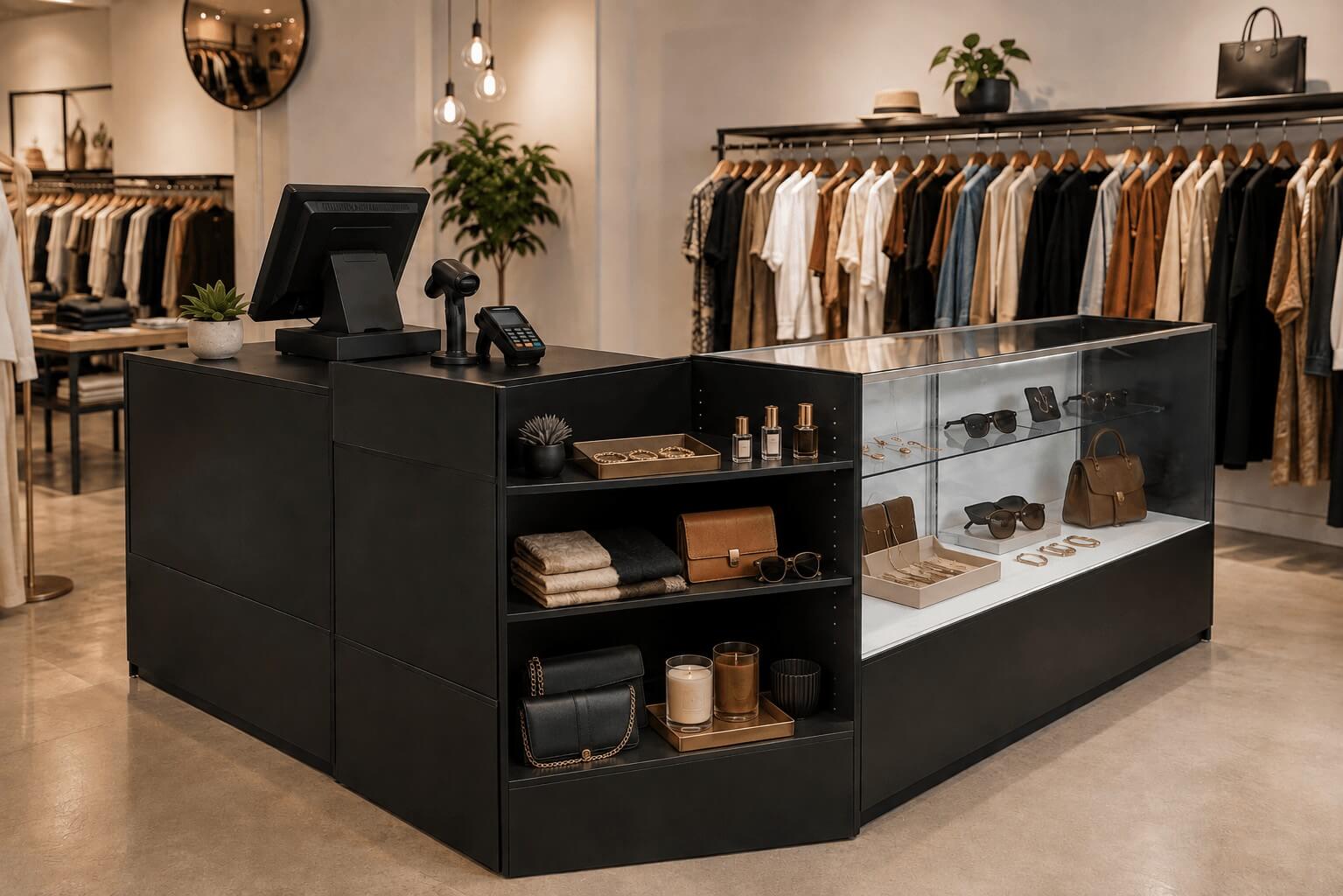
Your checkout counter represents the final impression customers have of your store, yet many retailers treat it as nothing more than a transaction point. Smart checkout counter design transforms this critical zone into an operational powerhouse that drives last-minute sales, protects inventory, and creates positive customer experiences.
The checkout area handles multiple functions simultaneously: payment processing, security monitoring, impulse purchasing, and customer service. When designed strategically, your retail POS setup becomes a profit center rather than just an operational necessity.
Essential Components of Strategic Checkout Zone Operations
A well-designed checkout zone balances efficiency with merchandising opportunity. Your counter needs adequate workspace for transactions while providing clear sightlines throughout the store for loss prevention.
Start with your primary counter structure. 48 Inch Service Counters and Well-Top Register Stands offer shelving and storage for cash handling supplies, and backup inventory.
Consider the traffic flow around your checkout area. Customers should move easily without creating bottlenecks, while staff maintains clear views of the sales floor. Position your counter at an angle that allows 270-degree visibility of key merchandise areas.
Workspace Organization for Transaction Speed
Transaction speed directly impacts customer satisfaction and your ability to handle peak traffic periods. Organize your checkout workspace with frequently used items within arm's reach of your register position.
Install shelf ticket holders to clearly display pricing for items without barcodes. Keep SSW 1-Line Pricing Guns , 2.25 inch Thermal Paper Cash Register Tape - 150' Long, and Kraft Paper Bags immediately accessible to avoid delays during checkout.
Maximizing Add-On Sales at Checkout Through Strategic Product Placement
The checkout zone offers your last opportunity to increase transaction values through impulse purchases. Research shows customers make 70% of their impulse buying decisions at the point of sale.
Position small, high-margin items within easy reach of waiting customers. Jewelry, accessories, and seasonal merchandise work exceptionally well as checkout impulse items. Full Vision Display Cases protect valuable items while keeping them visible to customers.
Create multiple price points for impulse purchases. Include items under $5, between $5-15, and $15-30 to accommodate different spending comfort levels. Rotate these products regularly to encourage repeat customers to browse during each visit.
Seasonal and Promotional Merchandise Integration
Use your checkout area to highlight seasonal promotions and limited-time offers. Burst sign cards draw attention to special pricing or new arrivals positioned near the register.
Bundle complementary items together at checkout. If you sell clothing, position belts, scarves, or jewelry nearby. For gift retailers, include greeting cards, gift wrapping supplies, and small add-on items that enhance the primary purchase.
Loss Prevention Through Smart Checkout Counter Design
Your checkout counter serves as a security command center for monitoring store activity. Design your setup to maximize visibility while protecting high-value inventory from theft.
Position Security Mirrors strategically to eliminate blind spots in your store layout. Install your checkout counter where staff can observe fitting rooms, merchandise displays, and entrance/exit points simultaneously.
Store high-theft items in locked showcases behind the counter. Keep gift cards, small electronics, and other frequently stolen merchandise secure but visible. Wall Display Cases and Countertop Display Cases work well for accessories, watches, and other valuable items.
Cash Handling and Security Considerations
Design your checkout area to minimize cash handling risks. Keep register drawers organized with proper bill denominations and adequate change supplies. Install adequate lighting to help staff identify counterfeit bills or suspicious activity.
Create designated areas for processing returns and exchanges away from the main transaction counter when possible. This prevents disruption to normal checkout flow while maintaining security protocols.
Boutique Checkout Fixtures That Enhance Customer Experience
Independent retailers can differentiate themselves through thoughtful checkout design that reflects their brand personality. Your fixtures should complement your store's overall aesthetic while maintaining functionality.
Consider the height and scale of your checkout counter relative to your customer base. Standard counter height works for most applications, but boutiques targeting specific demographics might adjust accordingly.
Integrate storage solutions that keep your checkout area organized without appearing cluttered. Wholesale Jewelry Boxes can serve dual purposes as both storage and product presentation.
Creating Comfortable Customer Interactions
Design your checkout process to feel welcoming rather than transactional. Provide adequate counter space for customers to set down purses, shopping bags, or other items during payment processing.
Include subtle branding elements that reinforce your store identity without overwhelming the space. Use custom packaging and bags that extend your brand experience beyond the store visit.
Technology Integration in Modern Retail POS Setup
Modern POS systems require thoughtful integration into your checkout counter design. Plan for cable management, device positioning, and future technology upgrades during the initial design phase.
Ensure adequate electrical outlets and internet connectivity for your POS system, receipt printer, barcode scanner, and payment processing equipment. Plan for backup power solutions in case of outages.
Position customer-facing screens and payment terminals at comfortable angles and heights. Consider the ergonomics for both staff and customers during extended transaction periods.
Inventory Management Integration
Use your checkout counter as a hub for inventory management activities. Install Tagging, Labeling & Price Tags supplies in easily accessible locations for quick price changes or new merchandise processing.
Create designated areas for processing online orders, handling returns, and managing special orders. These activities often require additional counter space and storage for packaging materials.
Measuring Success and Making Adjustments
Monitor key metrics to evaluate your checkout counter design effectiveness. Track average transaction values, checkout speed, and customer feedback about their checkout experience.
Pay attention to which impulse items sell most frequently and adjust your product mix accordingly. Rotate merchandise regularly to test different categories and price points for add-on sales effectiveness.
Observe customer behavior during peak and slow periods. Note where customers naturally look or reach while waiting in line, and position merchandise in these high-attention zones.
Your checkout counter design should evolve with your business needs and customer preferences. Regular assessment and strategic adjustments transform this critical area into a powerful tool for operational efficiency and revenue growth. The investment in thoughtful checkout zone planning pays dividends through improved customer satisfaction, increased transaction values, and better loss prevention outcomes.
Written by Kris Boettigheimer
Purchasing Assistant
Kris brings over 32 years of retail industry experience and more than 20 years at Store Supply Warehouse to every article he writes for storesupply.com. Since joining SSW in 2005, Kris has worked across multiple departments — including six years in Sales/Customer Service, where he helped independent retailers and small business owners find the right store fixtures, retail displays, and merchandising supplies to improve their store layouts and drive sales. For the past 15+ years in SSW's Purchasing Department, he has collaborated with suppliers, tracked market trends, and sourced products across all three Store Supply divisions. Today, Kris channels that hands-on experience into content that helps retailers enhance store presentation, discover new display solutions, and make smarter product decisions.